
Run multiple Claude Code sessions at once
A dozen agents running at once, and one glance that says which of them needs you.
The short answer
Open cowork-deck, point a workspace at a project folder, and press
New session as many times as you have work. Each press starts a
real claude process in a PTY and gives it a tile. There is no
limit in the app: the ceiling is your machine and your Claude plan, not a
licence.
What makes a dozen of them usable is not the grid. It is that the app knows what each one is doing.
State, as a colour along one edge
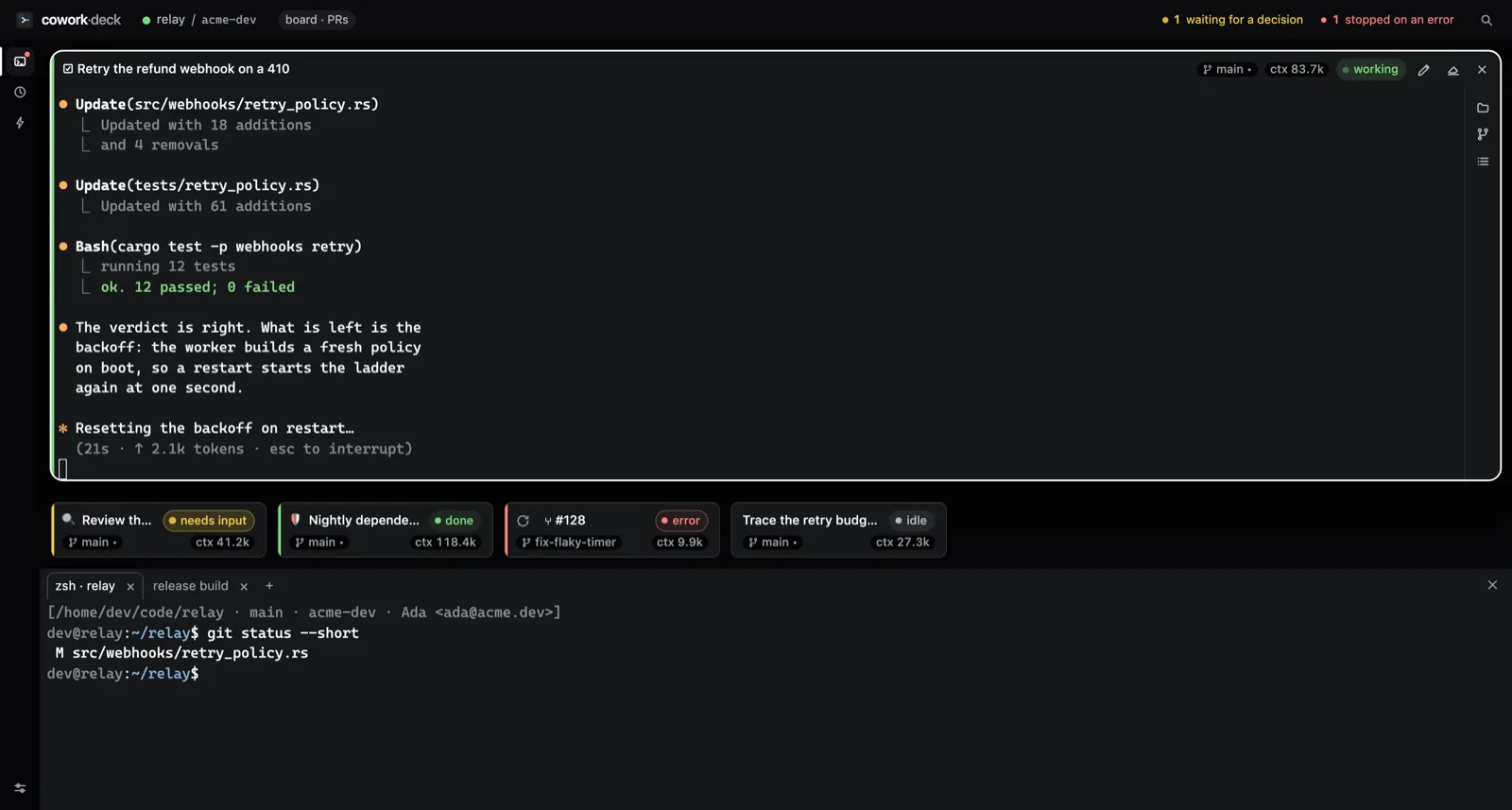
Claude Code reports its own lifecycle through hooks. cowork-deck listens, and turns what it hears into a rail down the left edge of every tile:
- working — a turn is in flight.
- waiting on you — blocked on a permission request, and going nowhere until someone answers.
- finished a turn — parked at the prompt, done, wanting nothing.
- stopped on an error — and the tile says which.
“Finished” and “waiting” are deliberately separate. An
interactive claude sits at its prompt when it has finished,
which looks identical to sitting at a permission prompt and is the opposite
situation. Conflating them is what makes a tab strip useless at ten
sessions: you cannot tell the session that is done from the one that has
been stuck for eleven minutes.
The top bar reduces the whole deck to two numbers — how many are waiting for a decision, how many stopped on an error. Each number opens one of the sessions it counted. A run that finished while nobody was watching is not in it, because it does not want anything.
Sessions that name themselves
Six rows reading session · myproject are six rows you cannot
tell apart. A session started with no scenario takes its name from Claude
Code's own transcript, so the list reads as topics instead. The name says
what the conversation started as; F2 renames any tile,
and emptying the field hands the automatic name back.
Zoom, and the filmstrip
Double-click a tile's header and it takes the window; the rest fall into a filmstrip of cards below it. The cards deliberately carry no terminal — at that size a terminal is texture, not information — so the space goes to the four things worth knowing about a session you are not currently reading: its name, its state, its branch, and what it has spent.
Nothing is torn down without asking
Quitting names the sessions that still have something running and waits.
What gets killed is the whole process session, so an npm run
build started inside a shell dies with it rather than outliving the
app. Restart resumes the conversation with claude --resume, and
yesterday's tiles come back on the next launch.
Sessions are children of the app: there is no detached mode, and the scheduler only fires while the window is open. That is a deliberate limit, not an oversight — see scenarios and schedules for what happens to a run that was missed.
If the hooks do not fire
On an older claude, or if a hook fails, the terminal is
unaffected: you type, scroll and work normally. The only symptom is a tile
whose state label stays on idle. Nothing about the session
depends on the state tracking working.